Kraken Ultimate Review: Real User Experience After 3 Months
Introduction
I've been using the Kraken Ultimate for roughly three months now in my daily routine — gaming sessions, working from home, meetings, and music listening. I bought it outright because I wanted a headset that could do everything reasonably well: strong game positional audio, a usable microphone for calls and streaming, and comfort for long sessions. What I found was a headset with a lot of strong points, a few compromises, and some quirks that only become apparent after extended use. This review is my honest, hands-on account of what it's like to live with the Kraken Ultimate day-to-day.
First Impressions and Unboxing
Right out of the box the Kraken Ultimate felt like a product that wanted to make an impression: it has a solid weight to it without feeling heavy, plush ear cushions with a cooling element, and RGB accents that give it a modern look. I was pleased with the packaging — everything felt protected and the included accessories were minimal but adequate. I set it up on my PC first, plugged into USB, installed the accompanying software, and spent the first hour fiddling with EQ presets and RGB lighting. This is where a lot of the headset's personality becomes visible: the hardware is straightforward, but the software layer adds most of the customization.
Comfort and Build Quality
Comfort was one of the main reasons I bought these. In my experience, the Kraken Ultimate does well in this department overall. The ear cups are thick and soft, and the cooling gel padding genuinely reduces the "warm ear" feeling during extended sessions. I wore the headset for multiple four-hour stretches without needing a break; there was some pressure after very long sessions, but nothing unbearable. If you wear glasses, you'll notice the usual pressure along the temples, but it wasn't worse than other closed-back gaming headsets I've used.
Build quality is a mixed bag. The headband has a metal reinforcement and feels durable. The earcups are mostly plastic, which keeps weight down but makes the headset feel less premium than full-metal alternatives. After three months of daily use I only see minor scuffs where the headset rubs against my desk — no structural issues. The hinge mechanism for adjusting the cup position is simple and reliable.
Sound: Games, Music, and Movies
Sound quality is where these headphones shine for their intended use. In games, positional cues were clear and reliable. What I found was that the spatial processing (the virtual surround feature) helps with footsteps and directional cues — useful in competitive shooters and exploration games alike. The bass is punchy without being bloated; explosions and low-frequency effects land with satisfying weight.
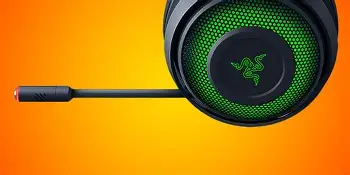
For movies the Kraken Ultimate delivers immersive sound, especially in action-packed sequences. The soundstage won't match a pair of open-back headphones or a true surround setup, but it offers a compelling "bigger than headphone" feeling when the virtual surround is enabled.
Music listening is where my impressions become more nuanced. I noticed that the headset favors a V-shaped tuning — boosted lows and highs with a slightly recessed midrange. That made modern pop, electronic, and cinematic tracks sound exciting, but vocal-heavy or acoustic tracks sometimes lacked presence. I spent a fair amount of time with the equalizer in the software and was able to dial back some of the highs to achieve a more natural midrange, but purists will prefer a flatter-response pair of headphones for critical listening.
Microphone Performance
The microphone exceeded my expectations for a headset mic but still has the usual limitations. My voice sounds warm and intelligible on calls and in streams, with a clean midrange presence that listeners reported as "clear." The mic nails basic rejection of ambient noise, so normal room sounds and distant fans aren't prominent in recordings.
Shop the latest Audio & Headphones picks on Amazon.
Browse Now →That said, the microphone can pick up loud keyboard clacks when I'm gaming aggressively, and it captures sibilance on certain "s" sounds if you speak close to it. The software's noise gate and processing can help, but they can also introduce an unnatural gating effect if set too aggressively. For short streams, calls, and voice chat the Kraken Ultimate mic is perfectly serviceable. For dedicated content creators who prioritize studio-like vocal clarity, an external standalone mic will still be a better choice.
Software and Features
The software ecosystem is a double-edged sword. On one hand, the configuration options are robust: EQ presets, custom equalizer bands, surround profiles, microphone processing (noise gate, sidetone), and RGB control. I liked being able to quickly swap profiles for gaming vs music. On the other hand, the software can feel heavy and intrusive. It sometimes wants to run at startup and requires sign-in to save cloud profiles — something I didn't enjoy. During my usage there were a couple of times when the software failed to apply settings until I restarted it.
Feature-wise, the hardware draws a line in the sand: full functionality is unlocked via USB and the software. When I tried a simple analog connection (using a 3.5mm through an adapter on a console), I lost virtual surround and RGB control — the headset works, but with fewer features. If you expect the same functionality across multiple platforms, plan on using the USB mode on PCs for the full experience.
Durability After 3 Months
After three months of daily use I felt comfortable assessing durability. The headband elasticity remains the same, the ear cushions retained their shape and padding, and the microphone mechanism still feels sturdy. The cable is braided and hasn't shown wear where it plugs into my PC. I did notice some slight peeling of the aesthetic finish on the outer ring of an earcup where it contacts a wall-mounted hook, but that is cosmetic only.
Overall, I’d say the Kraken Ultimate holds up well for typical consumer use. Heavy pro-level usage might reveal more wear over a year or two, but so far I haven't seen performance degradation.
What I Appreciated
- Comfortable ear cushions with cooling gel — helpful during long sessions.
- Clear and punchy sound for gaming and movies; strong positional audio.
- Good, usable mic quality for calls and streaming without extra hardware.
- Customization through software — EQ and profiles are genuinely useful.
- Solid build where it matters: headband and cable quality feel reliable.
What Disappointed Me
- Software is clunky and can be intrusive; requires sign-in for some features.
- Sound tuning favors a V-shape; vocals and acoustic instruments may feel recessed.
- Full features tied to USB; analog/console use loses functionality.
- Plastic-heavy earcups reduce the premium feel compared to full-metal headsets.
- Microphone occasionally picks up loud keyboard noise and can sibilate.
Quick Pros & Cons
- Pros: Comfortable for long wear, excellent gaming/spatial audio, good mic, customizable EQ, durable headband.
- Cons: Software needs work, limited console functionality without USB, not ideal for audiophile music listening, some cosmetic plastic parts.
Comparison Table
| Feature | Kraken Ultimate (my review unit) | Typical Mid-Range Gaming Headset | Open-Back Studio Headphones |
|---|---|---|---|
| Comfort (long sessions) | High — cooling gel pads, stable clamping | Moderate — decent padding, can heat up | High — breathable, but less isolation |
| Positional Audio | Very good — virtual surround helps in games | Good — typically basic surround | Moderate — wide soundstage but less virtual surround |
| Microphone | Good — clear, usable for streaming/calls | Fair — usable but often tinny | None (usually requires external mic) |
| Music Fidelity | Good for casual listening; V-shaped tuning | Punchy but not balanced | Best — accurate and neutral for mixing/listening |
| Software & Customization | Extensive but heavy | Basic EQ/presets | Minimal (software-dependent) |
| Value for Gaming | High | Moderate | Low — unless paired with mic/amp |
Buying Guide: Is the Kraken Ultimate Right for You?
When I decided to purchase this headset I considered my main use cases: competitive gaming, streaming and meetings, and occasional music/movie nights. Below are the practical points I recommend checking before you decide to buy one yourself.
1. Platform Compatibility
If you primarily use a PC and value configuration options (EQ, surround, RGB), the Kraken Ultimate in USB mode will give you the best experience. If your primary use is on a console or mobile device, check whether the features you want (especially surround) will work over analog connections — in my experience, many features are USB-only.
2. Use Case: Gaming vs Music
Ask yourself whether you want a headset tailored for gaming or for high-fidelity music. In my experience, the Kraken Ultimate excels at gaming and immersive video. If you listen to a lot of acoustic or classical music and want a neutral reference sound, consider a separate pair of open-back headphones instead.
Looking for the best Audio & Headphones deals on Amazon?
View Offers →3. Comfort and Fit
Comfort is subjective. I recommend trying a headset on if possible, especially if you wear glasses or have a smaller/larger-than-average head size. The Kraken Ultimate's cooling gel and padding work well for me, but clamp force and ear shape will determine your comfort.
4. Microphone Needs
If you need a headset mic for frequent calls or casual streaming, the Kraken Ultimate's mic is a fine all-in-one solution. If you're recording professionally or need broadcast-level clarity, pair these with an external mic instead.
5. Software and Ecosystem
Consider whether you’re comfortable installing and signing into the vendor's software. If you want a plug-and-play experience without extra apps, be aware that many of the headset’s customizable features live inside the software and may not be available otherwise.
6. Budget and Value
Compare the Kraken Ultimate's price to alternatives in the same range. In my experience, it provides strong value for gamers who want an all-in-one headset with solid comfort and mic performance. If you want premium materials or studio-grade sound without a mic, other headphones may offer better value.
Tips for Getting the Most Out of the Kraken Ultimate
- Spend time with the equalizer. The stock tuning can be V-shaped; a modest mid boost helps vocals and dialogue.
- Use the virtual surround selectively. For competitive games it helps positional accuracy, but for music it can make the sound feel artificial.
- Adjust sidetone and microphone processing in software to avoid heavy gating or artificial compression.
- Keep the ear pads clean and store the headset on a stand to minimize cosmetic wear.
- If you use consoles frequently, confirm which features remain available over analog before relying on USB-only functionality.
Conclusion
After three months with the Kraken Ultimate, I've come away impressed with its strengths and aware of its compromises. It's a comfortable headset that's tuned for gaming, with strong positional audio, a usable microphone, and real customization potential through software. What I appreciated most was how quickly it became my go-to for long play sessions and movie nights. What I found frustrating at times was the software friction and the dependence on USB for full functionality — those are the kinds of trade-offs you discover after living with a headset for months.
In my experience, the Kraken Ultimate is an excellent fit for gamers and content creators who want a single, comfortable headset that covers gaming, voice chat, and casual media consumption well. If you're an audiophile seeking absolute neutrality, or if you dislike vendor software, you might want to look elsewhere. For me, it struck a strong balance between comfort, features, and everyday usability, and it's been a reliable daily driver through these three months.